Branding
RESTAURANT MOBILE APP
A mobile UX/UI design and prototype for a restaurant
Year :
Fall 2021 - Spring 2022
Tools :
Adobe XD, InVision, Google Forms, Adobe Illustrator
Team :
I collaborated with two teammates, a UX Researcher and a Visual Designer, who supported early research and initial design exploration. I led the group project and final design decisions
Role:
UX Research/Design, Mapping, Wireframing, Prototyping, Testing

Summary
Summary
Asian’s is a local restaurant in Berkeley, California. I collaborated with a small team including a UX Researcher and a Visual Designer to explore the problem space and gather early insights. From there, I led the UX direction and designed a mobile app concept that helps customers place orders more easily and reduces miscommunication caused by language barriers.
Problem
The restaurant had no online ordering system, and staff frequently faced miscommunication with customers due to language differences. This often resulted in incorrect orders and lost business.
Through early research conducted with my teammates including conversations with staff and regular customers we confirmed that a mobile app could make ordering faster, clearer, and more accessible. I took the lead in translating these insights into a user‑centered design solution.
Goal
Create a simple, intuitive mobile ordering experience that supports customers who struggle with in‑person communication and helps the restaurant streamline orders.
The process
Build. Measure. Learn
Build. Measure. Learn
Every project varies based on needs, goals, complexity, and constraints. For this project, I followed Lean UX principles:
Formulate and validate the hypothesis
Conduct user testing
Iterate based on feedback
Prototype and refine using Adobe XD and Figma
hypothesis
hypothesis
Customers who struggle with language barriers are more likely to prefer online ordering. Without a shared language, in‑person orders often lead to mistakes and frustration. A mobile app could make ordering faster, clearer, and more convenient for both customers and staff.
“I’d like to order online because the owner doesn’t speak English, and I’ve gotten the wrong order several times.”
Understanding the WHY in user research
To validate the problem, I spoke with both customers and staff. Many customers already relied on online ordering for other restaurants and said it would make their experience here much easier. Staff confirmed that miscommunication was a recurring issue. These insights highlighted the need for a simple, accessible ordering solution.
Conducting User Interviews
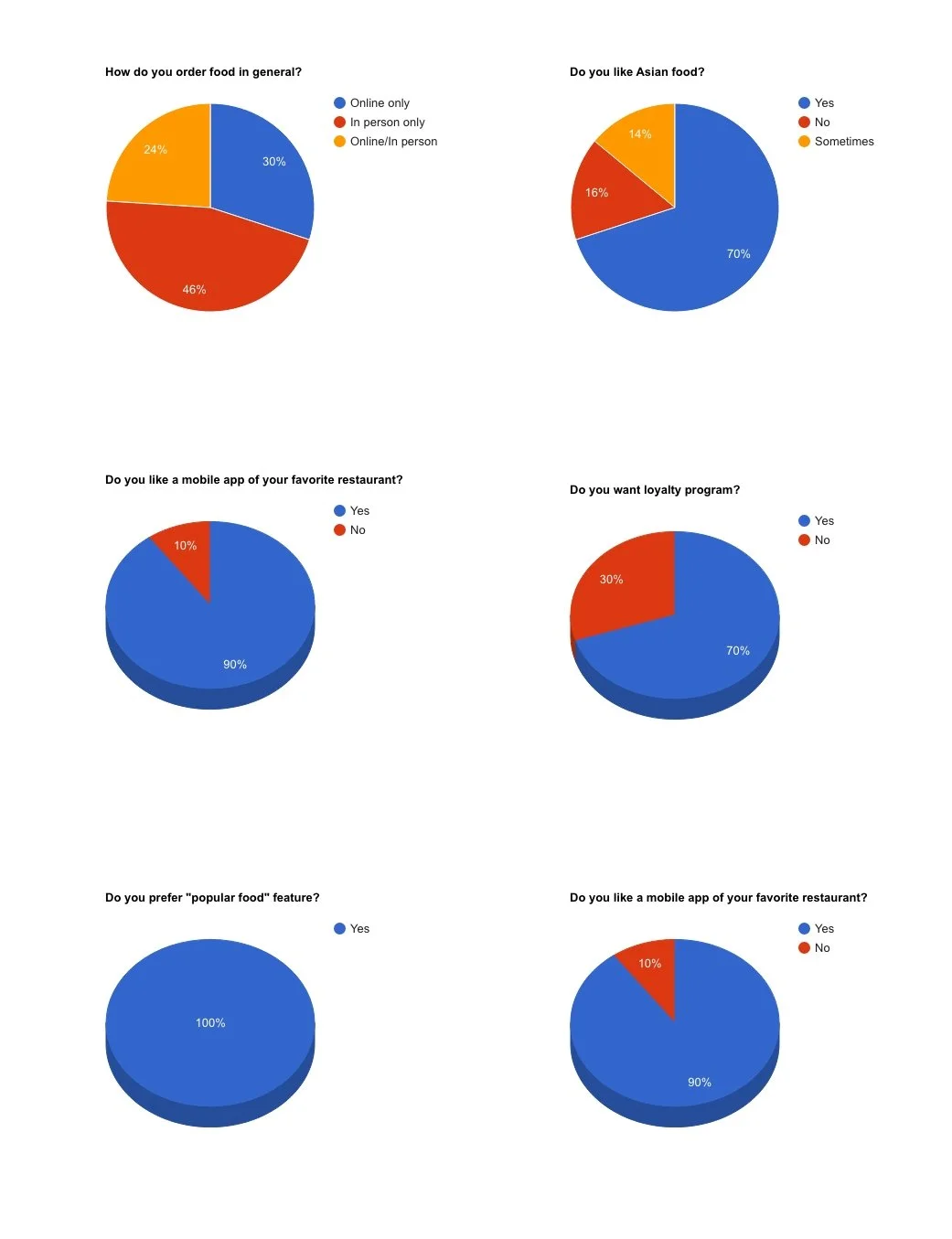
To validate my hypothesis, we ran a short survey and shared it with local customers through social media. We received 13 responses, which helped us understand what people expected from a restaurant app.
Key Findings
92% wanted their favorite restaurants to have a mobile app
Design response: Add a simple, intuitive ordering flow
77% were comfortable using English only, but some preferred language options
Design response: Include a language selector
100% wanted recommendations for popular dishes
Design response: Add a “Popular Items” section
70% were interested in loyalty rewards
Design response: Create a loyalty badge and credit system
Persona
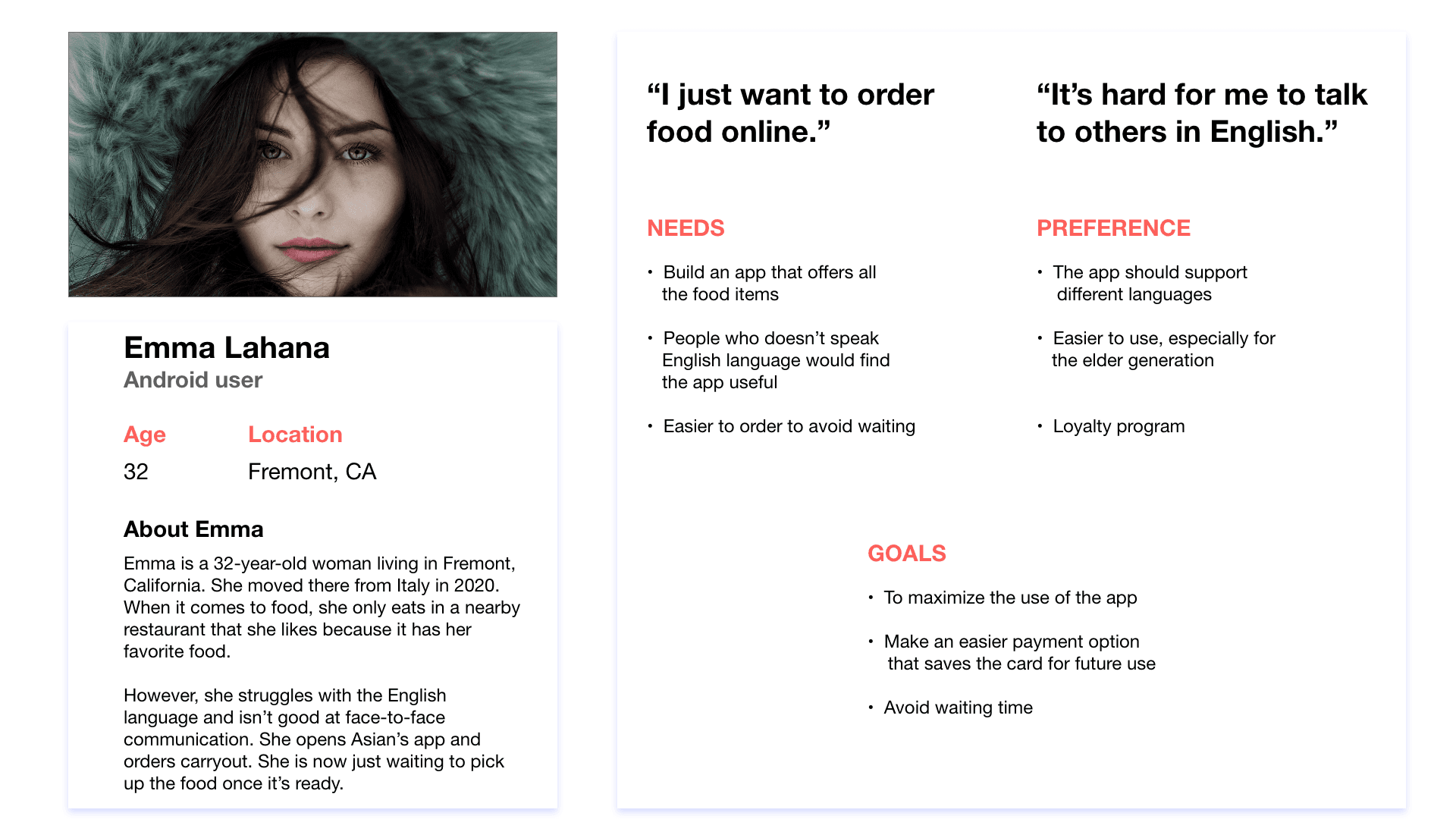
Based on my research, I created a persona to represent the primary customer using the app. This helped me stay focused on the user’s goals, needs, and frustrations throughout the design process.
Design Impact
The persona grounded my decisions in real user motivations. It guided key choices around navigation, language support, and feature prioritization, making sure the app felt intuitive and relevant.
Key Takeaways:
A Favorites feature so users can quickly reorder dishes they love
Clear pricing that feels affordable and transparent
Easy-to-browse food categories for faster discovery
A VIP badge and rewards for loyal customers
Moodboard
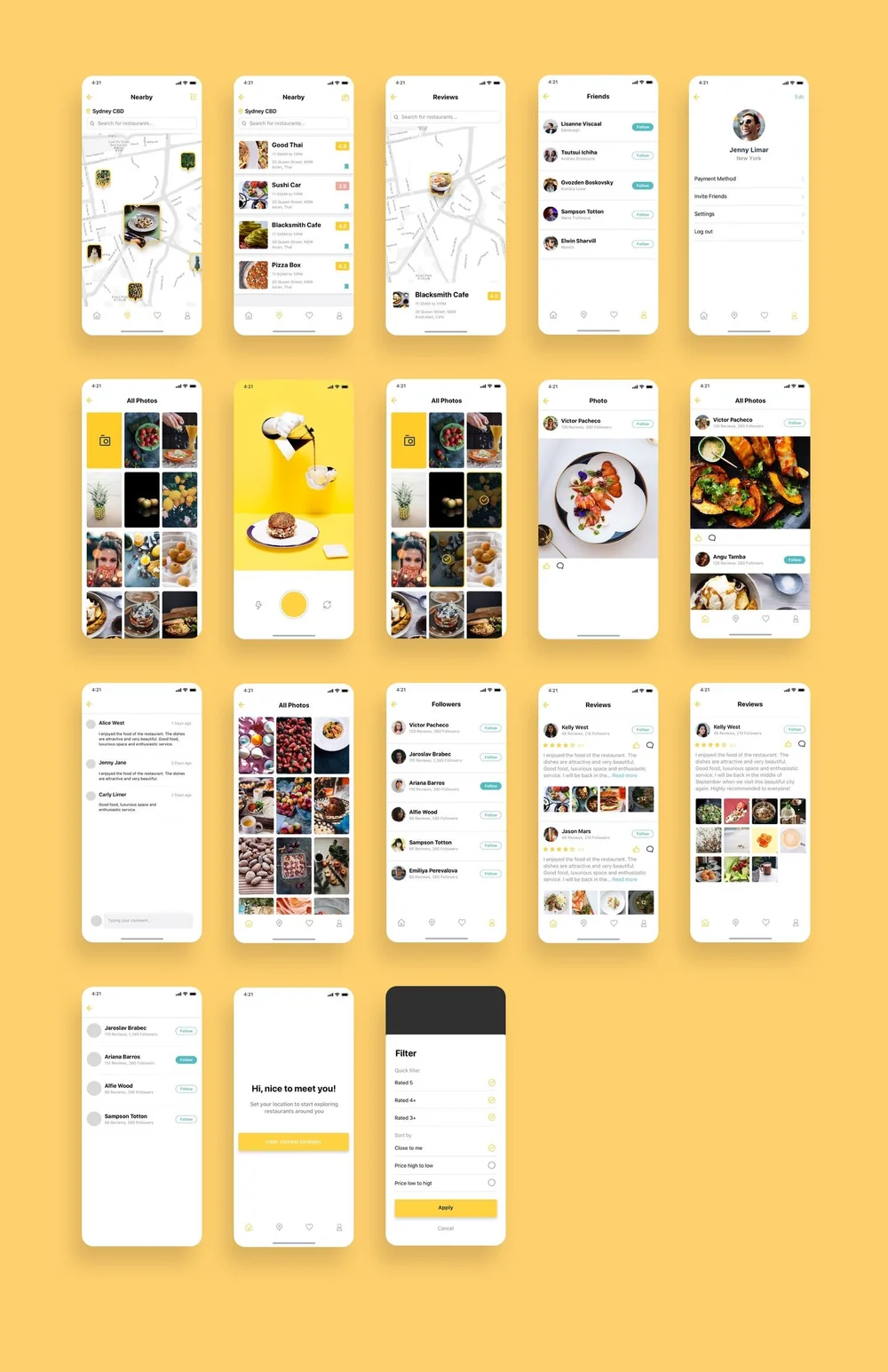
After identifying key user needs, I created a moodboard to explore the visual direction. I drew inspiration from existing food‑ordering apps with clean layouts and bold imagery to define the overall look and feel.
Potential Solution Rationale
To reduce friction for new users, I leaned on familiar food‑ordering patterns. This created a clear, intuitive flow without forcing users to learn a completely new interface. After testing several variations, users consistently preferred the simplest and most direct option.
design
Wireframes
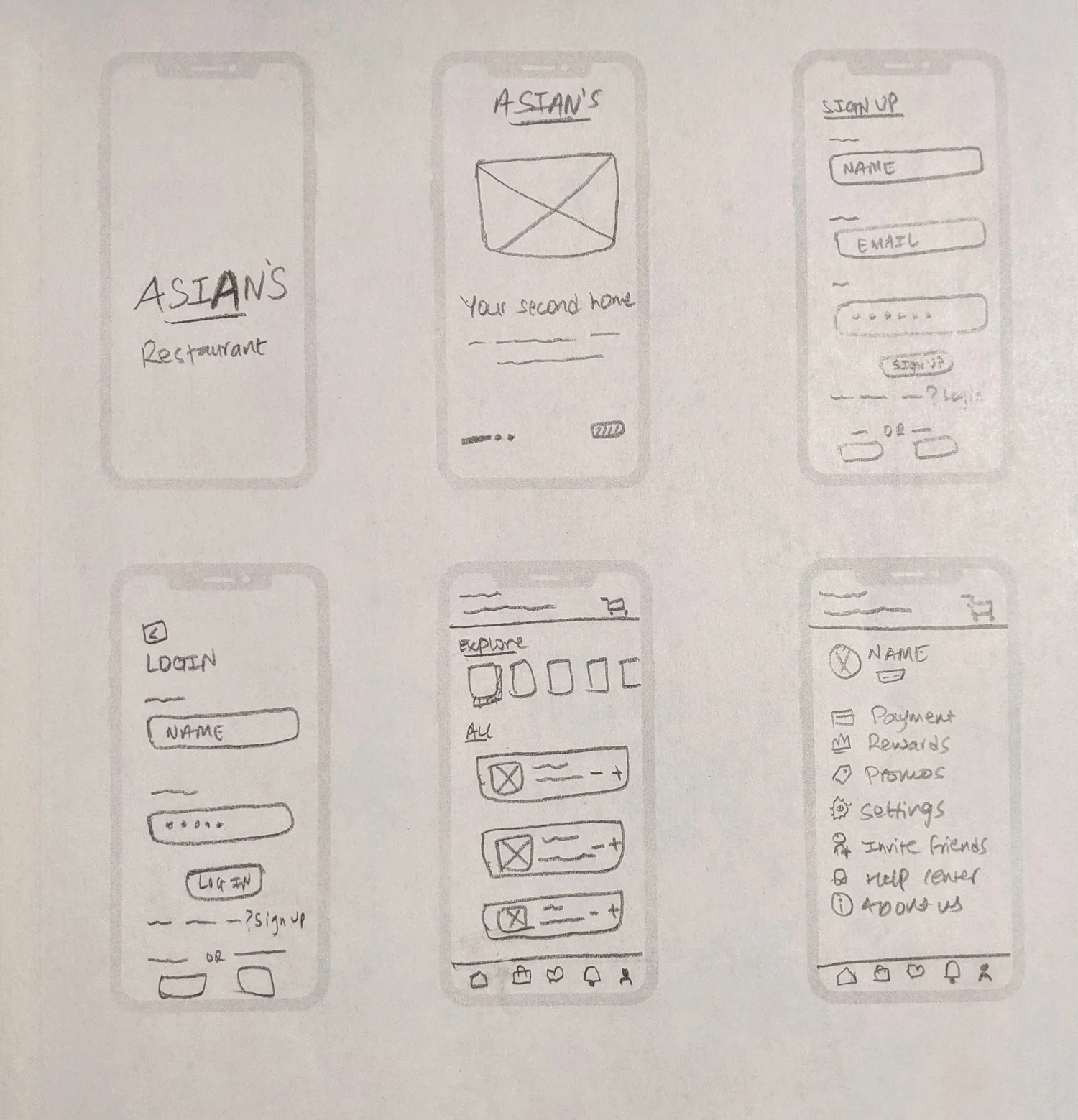
I created low‑fidelity wireframes in InVision to map out core user flows and validate the structure before moving into high‑fidelity screens.

Design System
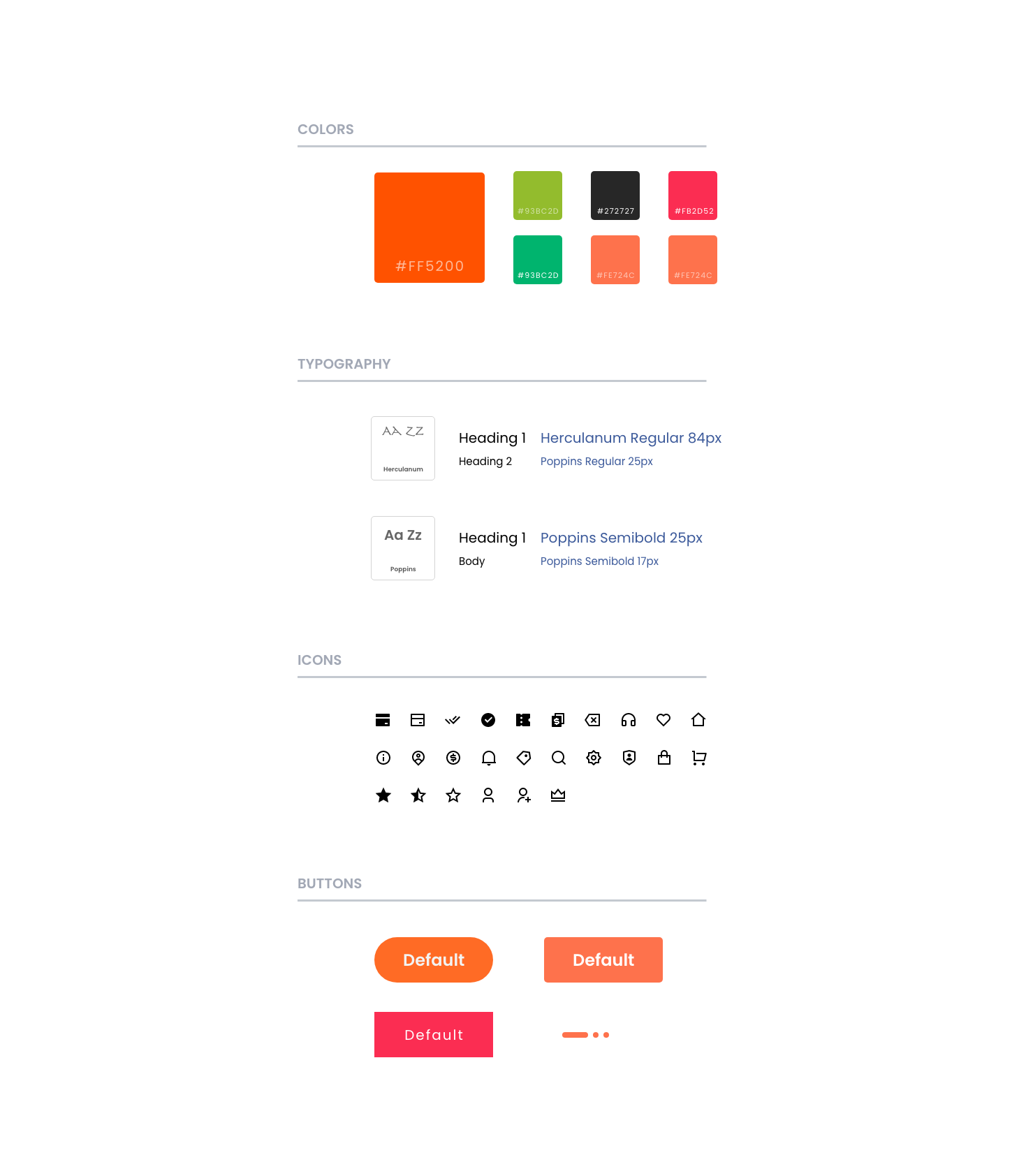
We built a small design system from scratch to ensure consistency across typography, color, spacing, and components.
Initial Design
Key Findings
Users appreciated having a brief introduction that sets expectations for the app
The payment flow needed to be simple and direct
Users wanted an easy way to browse different food categories
Design Decisions
Streamlined the payment process so it takes only two steps after tapping “Confirm Order”
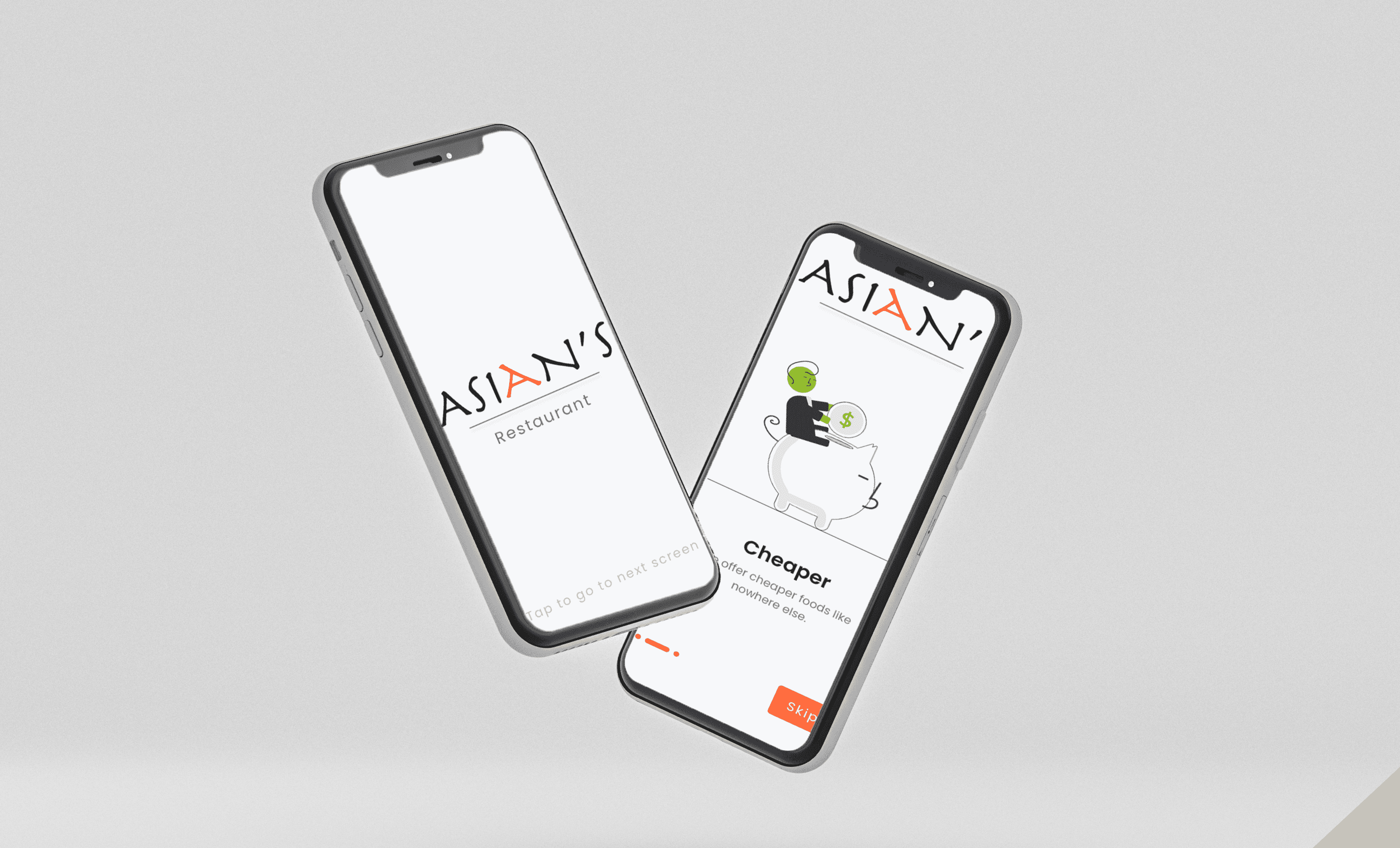
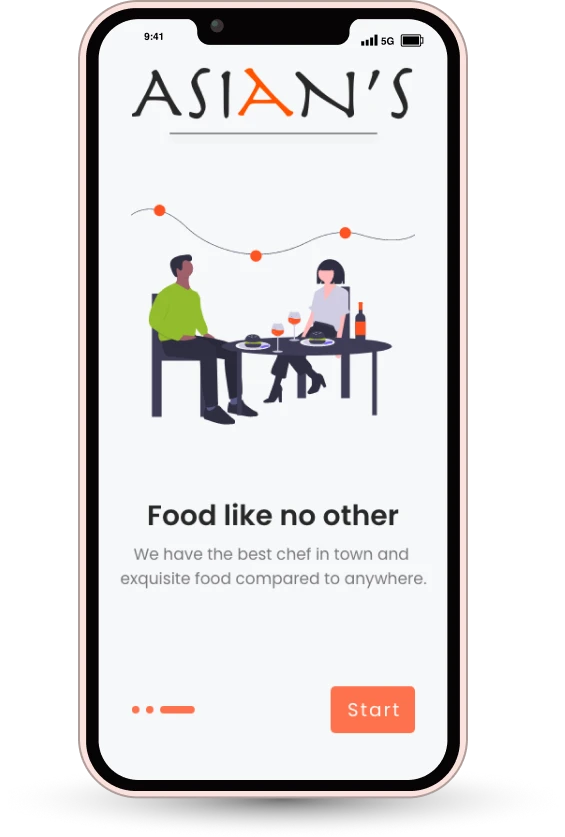
Designed a clear, welcoming introduction screen to set the tone and guide new users
Added intuitive food categories to help users explore the menu quickly
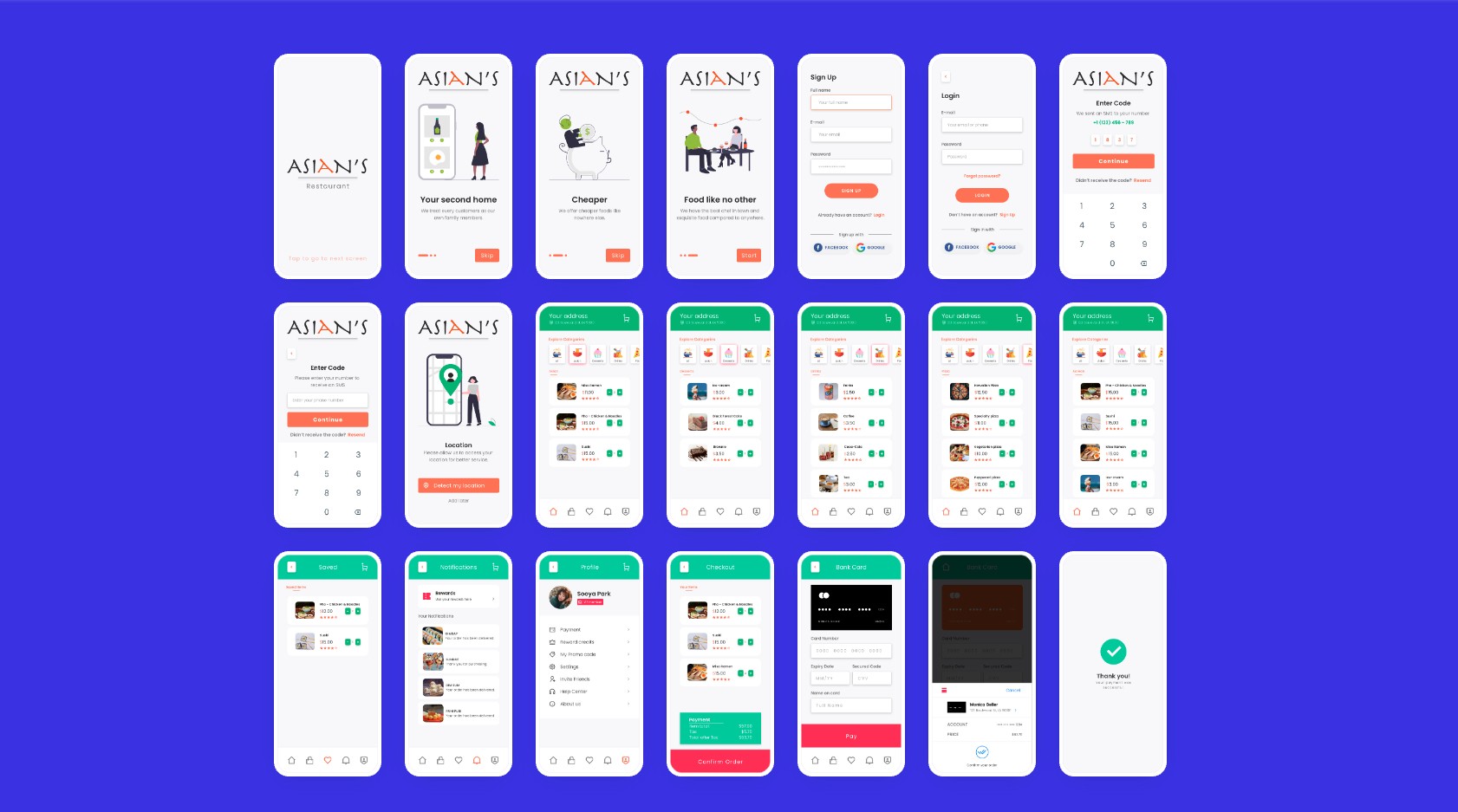
After validating the wireframes, I moved into high‑fidelity UI designs to bring the final look and feel to life.
High-Fidelity Mockup
I chose a bright, warm color palette to make the app feel inviting and energetic. Orange became the primary color to highlight key actions and create a friendly, modern look.
More User Testing
I ran additional usability tests to evaluate how well the structure supported real user behavior. Card sorting helped me understand how users naturally group information. Familiar patterns improved comfort and efficiency.
Key Feedback
The color palette felt cohesive and visually appealing.
Users appreciated having their address displayed at the top of the screen for quick confirmation.
PROTOTYPE
After completing research, ideation, design, and testing, I built a working prototype. I refined the visual hierarchy, adjusted UI elements, and ensured the flow felt intuitive and consistent with user expectations.
Project learnings
Throughout this project, I gained several important insights that strengthened both my design process and my understanding of users:
Conducting user research early is essential for making informed, user‑centered design decisions.
Flexibility is key as UX projects shift and evolve, and adapting along the way is part of the process.
Scope changes can be valuable, and each shift revealed new insights about user needs and improved the final solution.
The restaurant unfortunately shut down during the pandemic before the design could be implemented.
More Projects

Branding
RESTAURANT MOBILE APP
A mobile UX/UI design and prototype for a restaurant
Year :
Fall 2021 - Spring 2022
Tools :
Adobe XD, InVision, Google Forms, Adobe Illustrator
Team :
I collaborated with two teammates, a UX Researcher and a Visual Designer, who supported early research and initial design exploration. I led the group project and final design decisions
Role:
UX Research/Design, Mapping, Wireframing, Prototyping, Testing
Summary
Summary
Asian’s is a local restaurant in Berkeley, California. I collaborated with a small team including a UX Researcher and a Visual Designer to explore the problem space and gather early insights. From there, I led the UX direction and designed a mobile app concept that helps customers place orders more easily and reduces miscommunication caused by language barriers.
Problem
The restaurant had no online ordering system, and staff frequently faced miscommunication with customers due to language differences. This often resulted in incorrect orders and lost business.
Through early research conducted with my teammates including conversations with staff and regular customers we confirmed that a mobile app could make ordering faster, clearer, and more accessible. I took the lead in translating these insights into a user‑centered design solution.
Goal
Create a simple, intuitive mobile ordering experience that supports customers who struggle with in‑person communication and helps the restaurant streamline orders.
The process
Build. Measure. Learn
Build. Measure. Learn
Every project varies based on needs, goals, complexity, and constraints. For this project, I followed Lean UX principles:
Formulate and validate the hypothesis
Conduct user testing
Iterate based on feedback
Prototype and refine using Adobe XD and Figma
hypothesis
hypothesis
Customers who struggle with language barriers are more likely to prefer online ordering. Without a shared language, in‑person orders often lead to mistakes and frustration. A mobile app could make ordering faster, clearer, and more convenient for both customers and staff.
“I’d like to order online because the owner doesn’t speak English, and I’ve gotten the wrong order several times.”
Understanding the WHY in user research
To validate the problem, I spoke with both customers and staff. Many customers already relied on online ordering for other restaurants and said it would make their experience here much easier. Staff confirmed that miscommunication was a recurring issue. These insights highlighted the need for a simple, accessible ordering solution.
Conducting User Interviews
To validate my hypothesis, we ran a short survey and shared it with local customers through social media. We received 13 responses, which helped us understand what people expected from a restaurant app.
Key Findings
92% wanted their favorite restaurants to have a mobile app
Design response: Add a simple, intuitive ordering flow
77% were comfortable using English only, but some preferred language options
Design response: Include a language selector
100% wanted recommendations for popular dishes
Design response: Add a “Popular Items” section
70% were interested in loyalty rewards
Design response: Create a loyalty badge and credit system
Persona
Based on my research, I created a persona to represent the primary customer using the app. This helped me stay focused on the user’s goals, needs, and frustrations throughout the design process.
Design Impact
The persona grounded my decisions in real user motivations. It guided key choices around navigation, language support, and feature prioritization, making sure the app felt intuitive and relevant.
Key Takeaways:
A Favorites feature so users can quickly reorder dishes they love
Clear pricing that feels affordable and transparent
Easy-to-browse food categories for faster discovery
A VIP badge and rewards for loyal customers
Moodboard
After identifying key user needs, I created a moodboard to explore the visual direction. I drew inspiration from existing food‑ordering apps with clean layouts and bold imagery to define the overall look and feel.
Potential Solution Rationale
To reduce friction for new users, I leaned on familiar food‑ordering patterns. This created a clear, intuitive flow without forcing users to learn a completely new interface. After testing several variations, users consistently preferred the simplest and most direct option.
design
Wireframes
I created low‑fidelity wireframes in InVision to map out core user flows and validate the structure before moving into high‑fidelity screens.
Design System
We built a small design system from scratch to ensure consistency across typography, color, spacing, and components.
Initial Design
Key Findings
Users appreciated having a brief introduction that sets expectations for the app
The payment flow needed to be simple and direct
Users wanted an easy way to browse different food categories
Design Decisions
Streamlined the payment process so it takes only two steps after tapping “Confirm Order”
Designed a clear, welcoming introduction screen to set the tone and guide new users
Added intuitive food categories to help users explore the menu quickly
After validating the wireframes, I moved into high‑fidelity UI designs to bring the final look and feel to life.
High-Fidelity Mockup
I chose a bright, warm color palette to make the app feel inviting and energetic. Orange became the primary color to highlight key actions and create a friendly, modern look.
More User Testing
I ran additional usability tests to evaluate how well the structure supported real user behavior. Card sorting helped me understand how users naturally group information. Familiar patterns improved comfort and efficiency.
Key Feedback
The color palette felt cohesive and visually appealing.
Users appreciated having their address displayed at the top of the screen for quick confirmation.
PROTOTYPE
After completing research, ideation, design, and testing, I built a working prototype. I refined the visual hierarchy, adjusted UI elements, and ensured the flow felt intuitive and consistent with user expectations.
Project learnings
Throughout this project, I gained several important insights that strengthened both my design process and my understanding of users:
Conducting user research early is essential for making informed, user‑centered design decisions.
Flexibility is key as UX projects shift and evolve, and adapting along the way is part of the process.
Scope changes can be valuable, and each shift revealed new insights about user needs and improved the final solution.
The restaurant unfortunately shut down during the pandemic before the design could be implemented.
More Projects
Branding
RESTAURANT MOBILE APP
A mobile UX/UI design and prototype for a restaurant
Year :
Fall 2021 - Spring 2022
Tools :
Adobe XD, InVision, Google Forms, Adobe Illustrator
Team :
I collaborated with two teammates, a UX Researcher and a Visual Designer, who supported early research and initial design exploration. I led the group project and final design decisions
Role:
UX Research/Design, Mapping, Wireframing, Prototyping, Testing
Summary
Summary
Asian’s is a local restaurant in Berkeley, California. I collaborated with a small team including a UX Researcher and a Visual Designer to explore the problem space and gather early insights. From there, I led the UX direction and designed a mobile app concept that helps customers place orders more easily and reduces miscommunication caused by language barriers.
Problem
The restaurant had no online ordering system, and staff frequently faced miscommunication with customers due to language differences. This often resulted in incorrect orders and lost business.
Through early research conducted with my teammates including conversations with staff and regular customers we confirmed that a mobile app could make ordering faster, clearer, and more accessible. I took the lead in translating these insights into a user‑centered design solution.
Goal
Create a simple, intuitive mobile ordering experience that supports customers who struggle with in‑person communication and helps the restaurant streamline orders.
The process
Build. Measure. Learn
Build. Measure. Learn
Every project varies based on needs, goals, complexity, and constraints. For this project, I followed Lean UX principles:
Formulate and validate the hypothesis
Conduct user testing
Iterate based on feedback
Prototype and refine using Adobe XD and Figma
hypothesis
hypothesis
Customers who struggle with language barriers are more likely to prefer online ordering. Without a shared language, in‑person orders often lead to mistakes and frustration. A mobile app could make ordering faster, clearer, and more convenient for both customers and staff.
“I’d like to order online because the owner doesn’t speak English, and I’ve gotten the wrong order several times.”
Understanding the WHY in user research
To validate the problem, I spoke with both customers and staff. Many customers already relied on online ordering for other restaurants and said it would make their experience here much easier. Staff confirmed that miscommunication was a recurring issue. These insights highlighted the need for a simple, accessible ordering solution.
Conducting User Interviews
To validate my hypothesis, we ran a short survey and shared it with local customers through social media. We received 13 responses, which helped us understand what people expected from a restaurant app.
Key Findings
92% wanted their favorite restaurants to have a mobile app
Design response: Add a simple, intuitive ordering flow
77% were comfortable using English only, but some preferred language options
Design response: Include a language selector
100% wanted recommendations for popular dishes
Design response: Add a “Popular Items” section
70% were interested in loyalty rewards
Design response: Create a loyalty badge and credit system
Persona
Based on my research, I created a persona to represent the primary customer using the app. This helped me stay focused on the user’s goals, needs, and frustrations throughout the design process.
Design Impact
The persona grounded my decisions in real user motivations. It guided key choices around navigation, language support, and feature prioritization, making sure the app felt intuitive and relevant.
Key Takeaways:
A Favorites feature so users can quickly reorder dishes they love
Clear pricing that feels affordable and transparent
Easy-to-browse food categories for faster discovery
A VIP badge and rewards for loyal customers
Moodboard
After identifying key user needs, I created a moodboard to explore the visual direction. I drew inspiration from existing food‑ordering apps with clean layouts and bold imagery to define the overall look and feel.
Potential Solution Rationale
To reduce friction for new users, I leaned on familiar food‑ordering patterns. This created a clear, intuitive flow without forcing users to learn a completely new interface. After testing several variations, users consistently preferred the simplest and most direct option.
design
Wireframes
I created low‑fidelity wireframes in InVision to map out core user flows and validate the structure before moving into high‑fidelity screens.
Design System
We built a small design system from scratch to ensure consistency across typography, color, spacing, and components.
Initial Design
Key Findings
Users appreciated having a brief introduction that sets expectations for the app
The payment flow needed to be simple and direct
Users wanted an easy way to browse different food categories
Design Decisions
Streamlined the payment process so it takes only two steps after tapping “Confirm Order”
Designed a clear, welcoming introduction screen to set the tone and guide new users
Added intuitive food categories to help users explore the menu quickly
After validating the wireframes, I moved into high‑fidelity UI designs to bring the final look and feel to life.
High-Fidelity Mockup
I chose a bright, warm color palette to make the app feel inviting and energetic. Orange became the primary color to highlight key actions and create a friendly, modern look.
More User Testing
I ran additional usability tests to evaluate how well the structure supported real user behavior. Card sorting helped me understand how users naturally group information. Familiar patterns improved comfort and efficiency.
Key Feedback
The color palette felt cohesive and visually appealing.
Users appreciated having their address displayed at the top of the screen for quick confirmation.
PROTOTYPE
After completing research, ideation, design, and testing, I built a working prototype. I refined the visual hierarchy, adjusted UI elements, and ensured the flow felt intuitive and consistent with user expectations.
Project learnings
Throughout this project, I gained several important insights that strengthened both my design process and my understanding of users:
Conducting user research early is essential for making informed, user‑centered design decisions.
Flexibility is key as UX projects shift and evolve, and adapting along the way is part of the process.
Scope changes can be valuable, and each shift revealed new insights about user needs and improved the final solution.